# Dyeing

## What is dyeing?

One of the decorative patterns will carry more than one pattern for the user to choose from.&#x20;

Each pattern will have its own index and is randomly generated at the time that decoration pattern is opened.&#x20;

To convert which pattern to use for the decorator, we need to do the dyeing.

&#x20;                <img src="https://1306946730-files.gitbook.io/~/files/v0/b/gitbook-x-prod.appspot.com/o/spaces%2FGtLZR4sHSzGcn488y6Ks%2Fuploads%2FTdvFFSpVELtvkKpo9doR%2Feggs%203.png?alt=media&#x26;token=f884c85a-e6c8-4f67-aa86-489ea99af1d6" alt="" data-size="original"> >>>    ![](https://1306946730-files.gitbook.io/~/files/v0/b/gitbook-x-prod.appspot.com/o/spaces%2FGtLZR4sHSzGcn488y6Ks%2Fuploads%2FCeyEaUuQnkjVsiHkIy0e%2Feggs%205.png?alt=media\&token=a0daf0bd-2077-43f6-a037-3a7d773d4eac)

## Pigment

Pigment is the resource needed to perform dyeing.

<figure><img src="https://1306946730-files.gitbook.io/~/files/v0/b/gitbook-x-prod.appspot.com/o/spaces%2FGtLZR4sHSzGcn488y6Ks%2Fuploads%2FGrWyzPoOGQOJAO4bG8f3%2Fpigment.png?alt=media&#x26;token=8cfc0a84-45ff-4f20-b70b-37db22b35df7" alt=""><figcaption><p>Pigment</p></figcaption></figure>

## How to dye?

#### Step 1: Select Workshop button in main screen

<figure><img src="https://1306946730-files.gitbook.io/~/files/v0/b/gitbook-x-prod.appspot.com/o/spaces%2FGtLZR4sHSzGcn488y6Ks%2Fuploads%2FVyWIYCdiUpwPW4gFI0pn%2FSelect_workshop.png?alt=media&#x26;token=7256211c-d095-4f05-9e08-154e7bb78df6" alt=""><figcaption></figcaption></figure>

#### Step 2: Select Dyehouse

<figure><img src="https://1306946730-files.gitbook.io/~/files/v0/b/gitbook-x-prod.appspot.com/o/spaces%2FGtLZR4sHSzGcn488y6Ks%2Fuploads%2FFaolG6VtGpbiy9HHozB9%2Fselect_dyehouse.png?alt=media&#x26;token=41a9baa9-52e5-4d2a-bd8b-941db7814a83" alt=""><figcaption></figcaption></figure>

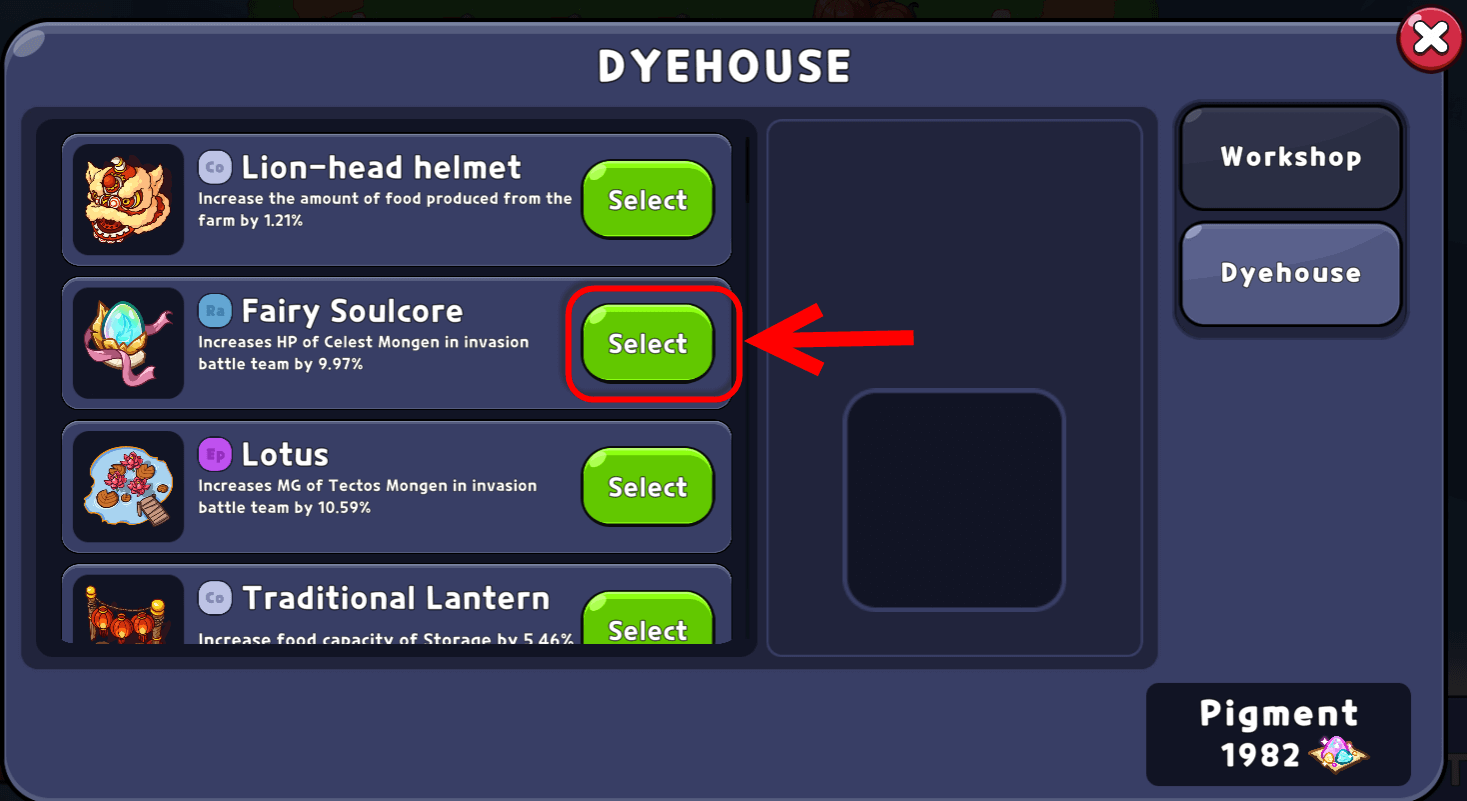
#### Step 3: Select a decoration part to dye

<figure><img src="https://1306946730-files.gitbook.io/~/files/v0/b/gitbook-x-prod.appspot.com/o/spaces%2FGtLZR4sHSzGcn488y6Ks%2Fuploads%2FI9kRdz45asGKPkf2ux1H%2Fselect_decoration_to_dye.png?alt=media&#x26;token=1f0fcc0c-3609-453f-ae70-839ea5a66ab1" alt=""><figcaption></figcaption></figure>

#### Step 4: Select pattern that you want to dye to

<figure><img src="https://1306946730-files.gitbook.io/~/files/v0/b/gitbook-x-prod.appspot.com/o/spaces%2FGtLZR4sHSzGcn488y6Ks%2Fuploads%2FxSp6ImLHZckOcXl1q3oX%2Fselect_pattern.png?alt=media&#x26;token=4c091f46-8320-4b26-ad6b-c8db417b3e66" alt=""><figcaption></figcaption></figure>

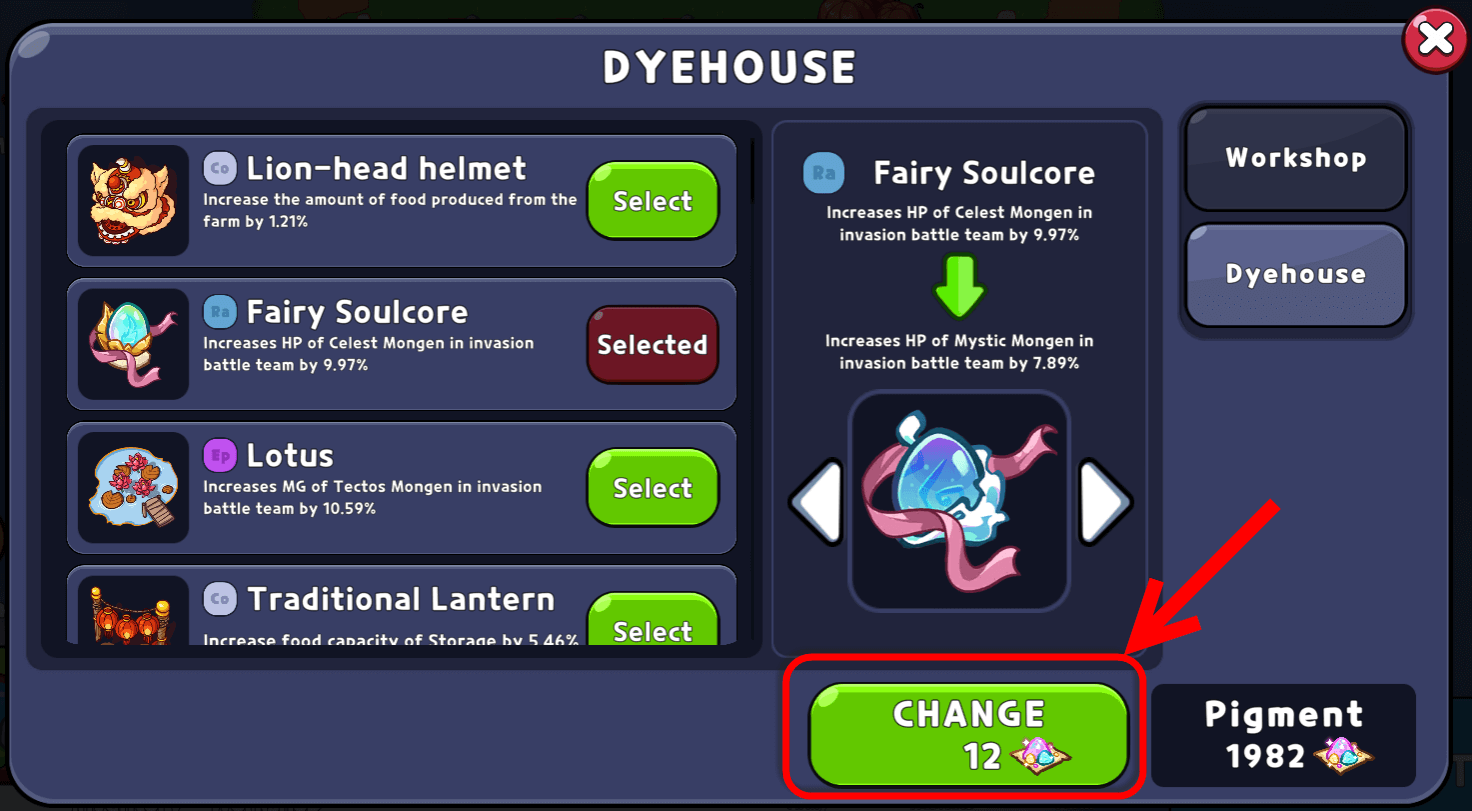
#### Step 5: Press on "Change" button and pay Pigment to dye

<figure><img src="https://1306946730-files.gitbook.io/~/files/v0/b/gitbook-x-prod.appspot.com/o/spaces%2FGtLZR4sHSzGcn488y6Ks%2Fuploads%2FBmNFf3nwVDEqAEprnvE8%2Fconfirm_change_pattern.png?alt=media&#x26;token=e4bfeadc-5725-41bc-b84c-92de1a0c4fa1" alt=""><figcaption></figcaption></figure>